


myQQ – Quick Quack
4.7366.00 Reviews
App Specs
- Version
- 4.25.1
- Updated On
- License
- Free
- Downloads
- 100,000+
- Developer
- Quick Quack Car Wash, LLC
- Categories
- Auto & Vehicles
- Platform
- Android, iOS
Screenshots

 Analysis by AppCompare
I’d approach myQQ as a practical companion for managing a Quick Quack Car Wash membership, not as a duck game or a general car-care app. That distinction matters: it is most useful when you already wash at Quick Quack and want a phone-based way to handle your membership, while it has little reason to stay installed if you do not use the company’s washes. For that specific job, the idea is straightforward, but the value depends on whether it fits your routine.
Start with the membership task
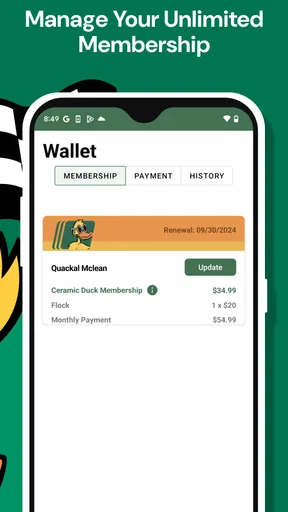
The clearest use for myQQ – Quick Quack is keeping your Unlimited Membership within reach. Instead of treating the app as something to explore for its own sake, I’d open it when I need to check or manage that membership, then make a habit of doing so before a wash rather than while I’m already in a queue. That small timing change makes a membership app more useful: you can deal with an account question at home, not when cars are waiting behind you.
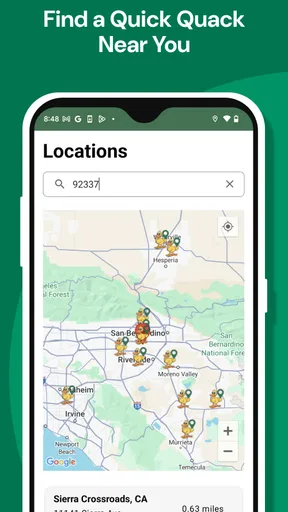
A realistic routine might be a weekly commute that passes a Quick Quack location. Before leaving, I would confirm I’m using the right membership account and have the app ready. If a family member usually takes the car, I would also agree in advance on who manages the account and who keeps the phone available. The app is aimed at membership management, so it should not be confused with a directory of every car wash or a way to compare every local service.
What to check before relying on it
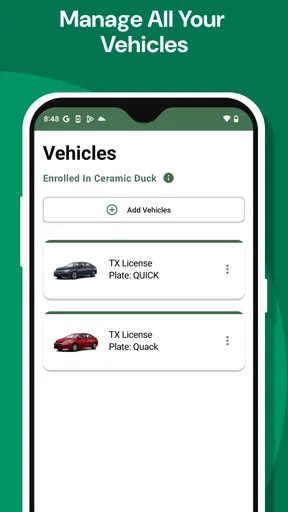
My advice is to spend a quiet minute getting familiar with the account and membership information the app presents, rather than assuming every useful detail will be obvious at the entrance. Check that you are signed into the account associated with the membership you intend to use. If you manage more than one vehicle or have recently changed account details, take extra care to make sure you are looking at the right membership before you set off.
I would also keep the practical fallback in mind: a phone app is convenient, but it is still a phone app. If your battery is nearly empty, your connection is unreliable, or you are helping someone else with the car, do not wait until the wash lane to solve an access problem. This is not a criticism unique to myQQ; it is a sensible habit for any digital membership. A little preparation reduces the chance that a routine stop turns into a stressful one.
Build a repeatable, low-friction habit
Experienced users do not need to open a membership app every day. The better pattern is to check it when something relevant changes: before a wash if you are unsure about the account, after updating membership details, or when another driver needs to know how the membership is handled. Once you know where the important account information sits, you can keep the interaction short instead of browsing around each time.
One useful household arrangement is to choose a single person to maintain the account and show other regular drivers what they need to know. That avoids multiple people making changes without coordination and makes it easier to notice if the membership information no longer matches the vehicle or driver using it. If you wash infrequently, a calendar reminder before an expected visit may be more useful than keeping the app open or checking it repeatedly.
Worth Reading Before You Choose

EA SPORTS FC Mobile 26 Is a Bigger Football Game, but It Takes Time

Flipboard Shows What News Apps Must Do Beyond the Feed

Switching to Android Auto Means Rethinking Your Driving Routine

Google Calendar Makes a Crowded Week Easier to Manage

Ludo King Makes the Most of the Minutes Between Plans

Baby Panda World Brings Quick Play to Modern Phones, but Its Game Library Feels Busy
Where this app fits among alternatives
Compared with using a paper record, searching old messages, or trying to remember membership details, a dedicated account app gives you one place to handle the Quick Quack membership. That is its strongest practical advantage. It is not a substitute for a broad vehicle-maintenance app, a map service, or a multi-brand wash comparison tool, though. If you mostly choose a wash based on location, price, or a one-off service, another option may suit you better than installing a brand-specific membership app.
myQQ is developed by Quick Quack Car Wash, LLC, and its focus is deliberately narrow. I see that as a useful trade-off rather than a flaw: people who regularly use the chain can value a direct membership-management tool, while drivers who wash at different businesses may prefer to keep their choices open and use each provider’s normal process. It is best judged by how often you need to manage this particular membership, not by how many unrelated features an app offers.
Limits worth understanding
The main limitation is the app’s dependence on a Quick Quack membership use case. Downloading it alone does not make it a general-purpose way to plan car cleaning, compare nearby operators, or manage vehicle maintenance. If you are considering an Unlimited Membership, decide whether the membership itself suits your driving and washing habits; an app can make account management more convenient, but it cannot make a poor-fit service worthwhile.
There is also a difference between having an account tool and having every answer at hand. If you are unsure about a membership rule, a billing question, or a change to your account, look for the relevant information in the app and use the company’s support route when a decision needs confirmation. I would not assume that an app screen replaces the terms of the membership or resolves every unusual account situation. That is especially important when a car is shared or someone else is paying.
Who should install it?
I’d recommend myQQ to someone who already uses Quick Quack and wants a direct way to manage an Unlimited Membership from a phone. It is also a reasonable choice for a household where more than one person drives a member’s car, provided everyone understands who handles account changes and how to prepare before visiting. People who value a simple, repeatable routine will get more from it than someone who downloads apps only when a problem arises.
I’d skip it if you do not use Quick Quack, prefer one-time washes, or want a single app for comparing multiple car-wash companies. It is free, rated for Everyone, and has an average rating of 4.3 from around 2.6 thousand ratings, with over 100 thousand installs. Those figures suggest that it has found an audience, but they do not tell you whether the membership fits your own needs. The app’s usefulness comes down to that match.
On Android, the current version is 4.18.0 and the minimum operating system requirement is Android 7.0. It was released on May 10, 2022. If you are choosing whether to install it, those details are useful for checking basic compatibility, while the more important question is still whether you have a Quick Quack membership to manage.
My overall view is that myQQ is a focused utility rather than an app I would recommend to every driver. Used as part of a clear routine—check the account before setting out, keep household responsibilities simple, and handle account questions away from the wash lane—it can make membership management feel less improvised. If you do not need that specific service, there is no compelling reason to add it to your phone.
Meet Your New Feathered Friend
Right from the get-go, myQQ – Quick Quack captures your attention with its vibrant colors and adorable duckling waiting to be adopted. It’s like having your own little buddy that fits right in the palm of your hand. You’ll quickly find yourself attached to this charming quacker, eager to see what it will do next.
Interactive Gameplay
What sets myQQ – Quick Quack apart from other virtual pet games is its interactive gameplay. You’re not just feeding and bathing your duck; you’re engaging in mini-games and activities that keep both you and your feathered friend entertained. The controls are intuitive, making it easy to navigate through the various tasks and games.
One moment you’re teaching your duck to swim, and the next, you’re playing dress-up or even going on little adventures. The variety of activities ensures that you never get bored, and there’s always something new to discover.
Customization Galore
One of the standout features of myQQ – Quick Quack is the level of customization it offers. You can personalize your duck with a wide range of outfits and accessories. Whether your style is classic or quirky, there’s something for everyone. It’s fun to mix and match styles, creating a unique look for your duck that reflects your personality.
Not only can you dress up your duck, but you can also personalize its habitat. Choose from different backgrounds and decorations to create the perfect home for your quacking companion.
Engaging Mini-Games
The mini-games are where myQQ – Quick Quack truly shines. They’re not just entertaining but also cleverly designed to improve your duck’s skills. From simple puzzles to more challenging races, these games are a great way to earn rewards and keep your duck happy.
Each mini-game is a delightful distraction, providing a break from the daily routine of pet care. Plus, the games are designed to be replayable, so there’s always a reason to come back and try to beat your previous scores.
Social Features
In today’s connected world, the option to share your experiences with friends is a big plus. myQQ – Quick Quack lets you connect with other players, show off your unique duck, and even participate in global events. It adds a layer of community and interaction that makes the game more engaging.
The social features are seamlessly integrated, allowing you to easily share snapshots of your duck’s adventures or outfit changes. It’s a fun way to connect and compete with friends or players worldwide.
Regular Updates
Nothing keeps a game fresh like regular updates, and myQQ – Quick Quack doesn’t disappoint. The developers are committed to enhancing the experience with new content and features. Whether it’s seasonal events, new mini-games, or additional customization options, there’s always something to look forward to.
These updates ensure the game remains engaging and relevant, encouraging players to return and see what new surprises await their feathered friends.
The Verdict
So, is myQQ – Quick Quack worth downloading? Absolutely! It’s a charming, fun, and engaging virtual pet game that offers hours of entertainment. With its interactive gameplay, extensive customization options, and vibrant community features, it’s perfect for anyone looking to care for a digital pet. Plus, the regular updates keep things fresh and exciting.
Whether you’re a long-time fan of virtual pet games or new to the genre, myQQ – Quick Quack is sure to win you over with its adorable duck and endless possibilities. So why wait? Dive into the world of myQQ and start your quacky adventure today!
Pros
- User-friendly interface enhances navigation.
- Customizable notification settings.
- Seamless integration with social media.
- Regular updates improve functionality.
- Offline mode available for flexibility.
Cons
- Limited language options for non-English users.
- Requires constant internet for some features.
- Occasional ads interrupt user experience.
- In-app purchases can be pricey.
- Support response time can be slow.
FAQs for myQQ – Quick Quack
What is myQQ – Quick Quack and how does it work?
myQQ – Quick Quack is an innovative app designed to streamline your daily tasks with the help of customizable quick actions. It allows you to set up shortcuts for frequent activities, such as sending emails, scheduling reminders, or accessing favorite apps. By simplifying multitasking, it aims to enhance productivity and save time.
Is myQQ – Quick Quack available for both Android and iOS devices?
Yes, myQQ – Quick Quack is available for download on both Android and iOS platforms. You can find it on the Google Play Store for Android devices and the Apple App Store for iOS devices. Ensure your device meets the minimum system requirements for optimal performance.
Are there any in-app purchases or subscription fees in myQQ – Quick Quack?
myQQ – Quick Quack offers a free version with essential features to get you started. There are also in-app purchases available, which provide additional functionalities and customization options. Users can opt for these advanced features if they find them beneficial to their workflow.
How secure is my personal data with myQQ – Quick Quack?
myQQ – Quick Quack prioritizes user privacy and data security. The app employs encryption to protect personal information and does not share data with third parties without consent. Regular updates ensure the app adheres to the latest security standards, providing a safe environment for users.
Can I customize the quick actions in myQQ – Quick Quack?
Absolutely! myQQ – Quick Quack is designed for flexibility, allowing you to fully customize the quick actions to suit your needs. You can create shortcuts for various tasks and organize them in a way that enhances your productivity. The user-friendly interface makes customization intuitive and straightforward.


